







Walmart: Shopping & Savings review
 Analysis by GetAllApps
I judge a shopping app by what it helps me decide, not just by how many products it can display. The Walmart app makes the most sense when I want to handle groceries and ordinary household shopping in one place, then choose a practical way to get those items. It is a free shopping app from Walmart, and its broad reach is reflected in a 4.7 average from around 7.6 million ratings. That popularity is reassuring, though it does not guarantee that every item or shopping experience will suit every location.
What matters when choosing a shopping app
Before relying on any retailer’s app, I ask three questions: Can I find the things I actually need? Can I tell whether the available option fits my schedule and budget? And will using it save enough effort to justify learning another account and checkout process? Walmart is strongest when the answer to the first question is yes across several kinds of shopping, rather than just one specialty.
Its appeal is practical rather than stylish. Walmart is already a familiar place for many shoppers to look for groceries, household basics, and other everyday items. Having those needs represented in a single app can reduce the back-and-forth between separate grocery and general retail services. For someone trying to plan a household restock, that convenience may matter more than a particularly polished browsing experience.
The audience numbers are substantial: the app has more than 100 million installs and around 583,000 reviews. I read that as evidence that it is a well-established option, not as a promise that every order will be equally smooth. Retail apps depend on the items and service options available to a shopper, so it is sensible to check the details for the specific basket rather than assume that the same choice will work for every purchase.
A useful fit for mixed shopping lists
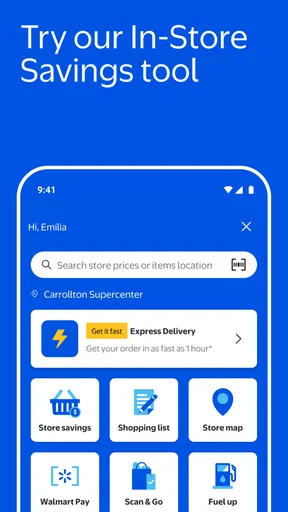
The clearest reason to try it is a shopping list that crosses categories. If I need ingredients for dinner alongside cleaning supplies or a basic household item, I would rather search and organize those needs in one retailer’s app than start from scratch in several places. That is a particularly useful workflow before a busy week: build the list while noticing what is running low, review the basket as a whole, and make a decision about how to get it.
That does not mean every product will be equally easy to compare. A focused grocery app may feel simpler if the only task is choosing fresh food, while a specialist retailer may make more sense when I care about a narrow product range. Walmart’s advantage is breadth and convenience for ordinary mixed errands; its trade-off is that a broad catalog can take more browsing than a dedicated store’s tighter selection.
Where Walmart earns its place
In my view, the app is most useful as a planning tool, not merely a digital checkout. I can think through the full errand before committing: what belongs in the basket, what can wait, and whether it is worth combining separate needs. This helps prevent the common mistake of making one small order and then discovering that another household essential calls for a second trip or another shopping session.
A realistic example is preparing for a weekend at home. I might start with food for meals, then add paper goods or a replacement for something used up during the week. Instead of treating groceries and household purchases as separate chores, I can see them as one list-building exercise. The useful insight is to make the list by need first, then browse by product; browsing without a plan can turn a quick restock into an unnecessarily long session.
Another practical habit is to review the basket before checkout as though it were a paper list. I look for duplicate items, quantities that do not match the household’s needs, and products that were added while browsing but are not actually urgent. This is especially worthwhile in a large retailer’s app, where the convenience of finding many kinds of goods can also make it easy to lose track of the original purpose of the order.
Walmart is also a reasonable starting point when I am not sure which kind of retailer is best for an everyday purchase. The app lets me investigate the retailer’s available selection before deciding whether to finish there or compare elsewhere. I would use that flexibility for routine goods, but for a purchase where exact specifications, specialist advice, or a particularly curated selection matter, I would widen the search rather than assume a general retailer is automatically the best match.
When the broad approach is less convenient
A wide-ranging shopping app can ask more of the shopper than a single-purpose service. Search results and product choices may require careful attention, and the most convenient way to receive an order can depend on the particular items and the options shown during the shopping process. I would not build a time-critical plan around an assumed delivery arrangement; I would check what is offered for the basket and location before counting on it.
Fresh groceries also call for a different kind of confidence than packaged essentials. If choosing produce in person is important to me, or I want to inspect a particular item before buying, a store visit may be the better option. The app can help organize the errand, but it cannot replace my own judgment about whether ordering fits the way I prefer to shop.
Likewise, shoppers who mainly want a specialist experience may be better served elsewhere. Someone buying a niche product could find a dedicated retailer easier to navigate, while a person who wants a small, tightly curated grocery selection may prefer an app centered only on food. I would choose Walmart for the convenience of combining common needs, not because one retailer has to win every category.
How to decide whether it is worth switching
The app is free, so the main cost of trying it is not an upfront purchase; it is the time spent setting up a routine and learning how its shopping flow works. Walmart is the developer, and the app has been available since May 6, 2011. Its current version is 26.40.1, and it requires iOS 9 or later. It is rated for Everyone, making its age classification broad, although an adult should still use ordinary judgment about purchases and account activity.
If I already use another retailer’s app, I would not replace it immediately. I would test Walmart with one ordinary, low-pressure shopping list and compare the result with my existing method: how easy it was to find the items, whether the choices suited me, and whether the overall process saved a trip or reduced hassle. That small trial gives a more useful answer than downloading a second app and moving every routine over at once.
There is also no need to treat the app as an all-or-nothing commitment. It can be useful for checking a mixed list or planning a larger household restock while another service remains better for a regular specialty purchase. Keeping that distinction clear helps avoid duplicate accounts becoming clutter, and it lets each retailer earn its place through the kind of shopping it handles well.
One trade-off worth considering is habit. If I already know where I prefer to buy a particular product, changing apps may add work without improving the outcome. But if my shopping is spread across everyday categories and I often make separate trips for each, trying Walmart could simplify the planning stage. I would switch only where the convenience is real for my own routine, rather than assuming that a popular app must be the right default.
My recommendation
I recommend Walmart to people who want one familiar place to plan everyday shopping across groceries and household essentials, especially when combining errands is more important than using a specialist service for each category. The app has a 4.7 average rating and a large user base, but the best reason to choose it is the practical possibility of organizing a mixed basket without dividing the task among several retailers.
I would skip it as my main option if I rarely shop at Walmart, strongly prefer selecting fresh goods in person, or need a specialist’s depth for most purchases. I would also compare the options shown for an actual basket before relying on a particular fulfillment plan. Those are not reasons to dismiss the app; they are reminders that convenience depends on what I am buying and how I like to shop.
For most curious shoppers, my advice is simple: try it with a routine list, review the basket carefully, and judge it against the way you already handle errands. If it makes mixed shopping easier, keep it in your rotation. If a focused grocery service, a specialist retailer, or a store visit better fits your needs, there is no reason to switch just for the sake of using another app.
Pros and cons
Pros
- Save favorite items for faster repeat purchases.
- Store receipts digitally for easier purchase tracking.
- Use barcode scanning to look up products in stores.
- Choose pickup or delivery for many grocery orders.
- Create shopping lists and share them with others.
Cons
- Some features require location access to work well.
- Product availability can vary by store and region.
- Delivery fees may apply to eligible orders.
- Prices and promotions can differ between online and in-store.
- The app may send frequent promotional notifications.


